Client
Client
Concept Project
Concept Project
Project Type
Project Type
App, Travel
App, Travel
Duration
Duration
6 months
6 months
Role
Role
UX/UI Designer
UX/UI Designer
OVERVIEW
OVERVIEW
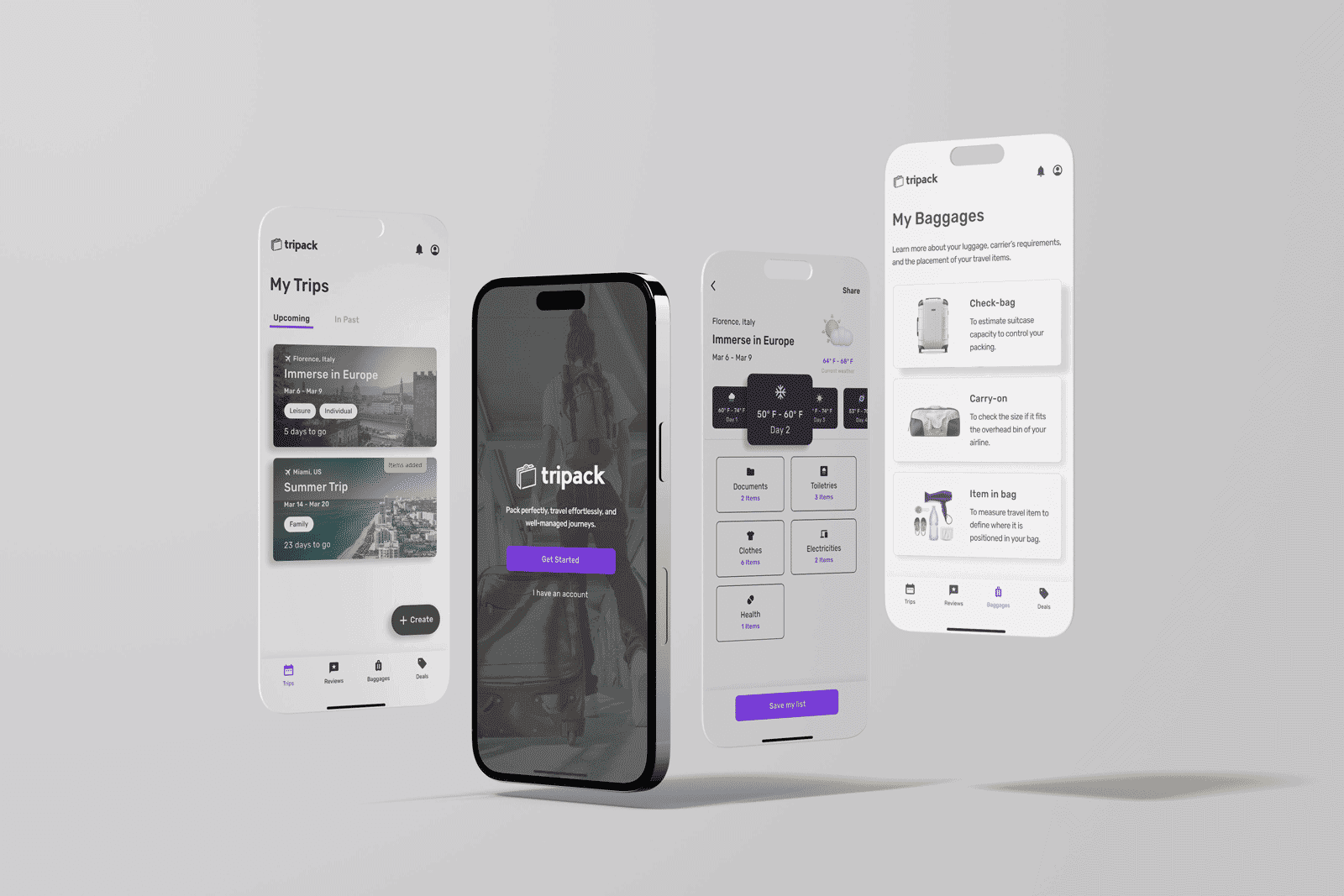
Tripack is a mobile app that helps travelers pack smarter and avoid overweight or oversized baggage. Informed by early research on packing habits, the project aimed to create a user-centered solution that prevents last-minute baggage issues before airport check-in. I independently led the end-to-end design process, from initial research to final prototype.
Tripack is a mobile app that helps travelers pack smarter and avoid overweight or oversized baggage. Informed by early research on packing habits, the project aimed to create a user-centered solution that prevents last-minute baggage issues before airport check-in. I independently led the end-to-end design process, from initial research to final prototype.
PROBLEM
PROBLEM
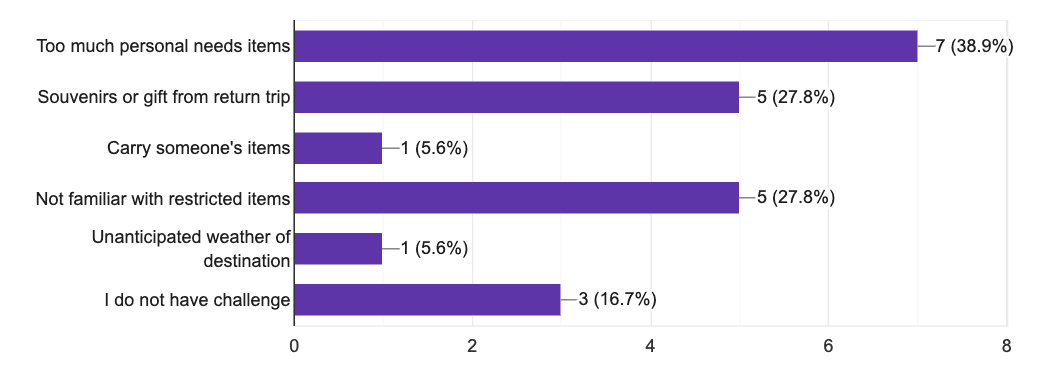
To understand travelers’ packing challenges, I conducted a quantitative survey using Google Forms. Over half of the 18 participants reported packing issues, such as overpacking non-essentials, buying extra items during trips, or not following airline baggage policies.
How might we support travelers in making smarter packing decisions to reduce stress and baggage issues before departure?
To understand travelers’ packing challenges, I conducted a quantitative survey using Google Forms. Over half of the 18 participants reported packing issues, such as overpacking non-essentials, buying extra items during trips, or not following airline baggage policies.
How might we support travelers in making smarter packing decisions to reduce stress and baggage issues before departure?
SOLUTIONS
SOLUTIONS
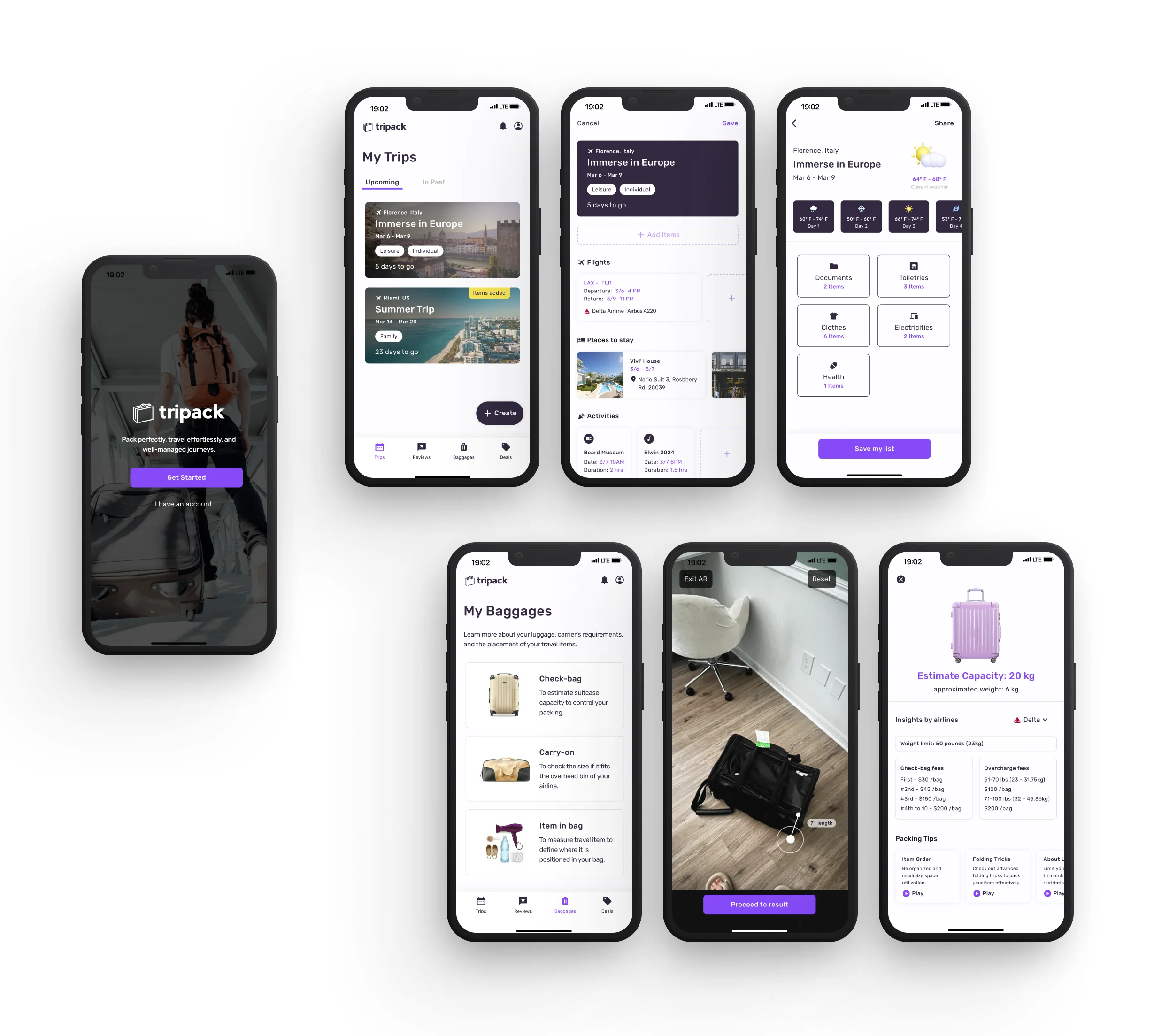
The app offers smart packing assistance through features like a luggage measurement tool, trip management, destination-based packing tips, and exclusive luggage deals. These tools work together to help travelers stay organized, pack efficiently, and avoid last-minute baggage issues extensively.
The app offers smart packing assistance through features like a luggage measurement tool, trip management, destination-based packing tips, and exclusive luggage deals. These tools work together to help travelers stay organized, pack efficiently, and avoid last-minute baggage issues extensively.
OUTCOME
OUTCOME
Users valued the digital baggage measurement and destination reviews. Some suggested a simulation to see how carry-on bags fit in aircraft bins and appreciated the insights gained from location reviews, even though these are not yet developed.
Users valued the digital baggage measurement and destination reviews. Some suggested a simulation to see how carry-on bags fit in aircraft bins and appreciated the insights gained from location reviews, even though these are not yet developed.

Key Phases
Key Phases

#1. EMPATHIZE
#1. EMPATHIZE
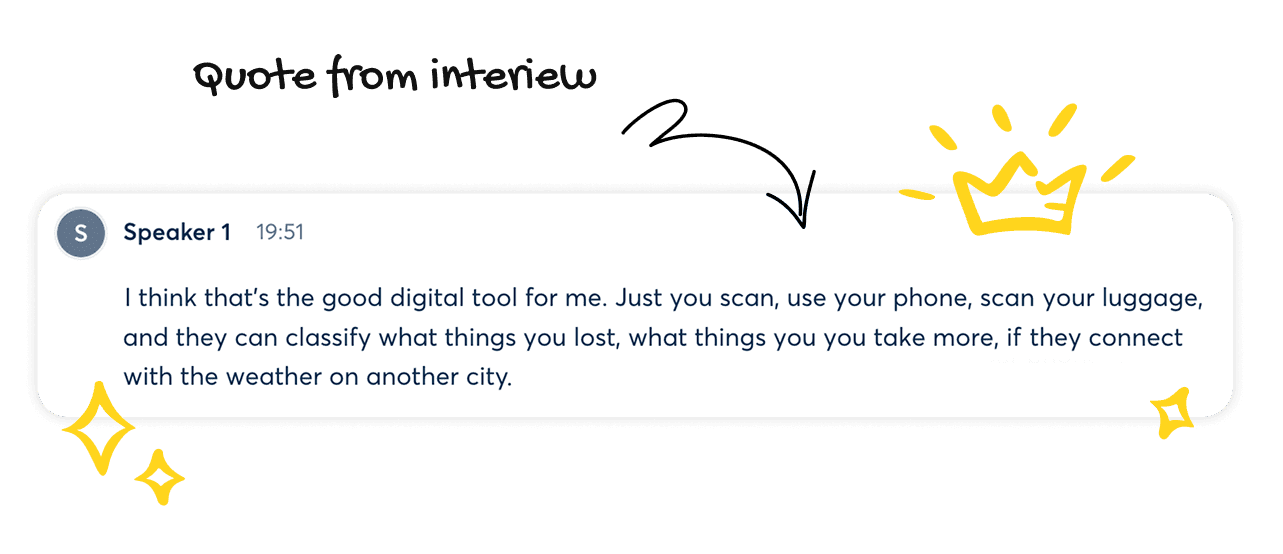
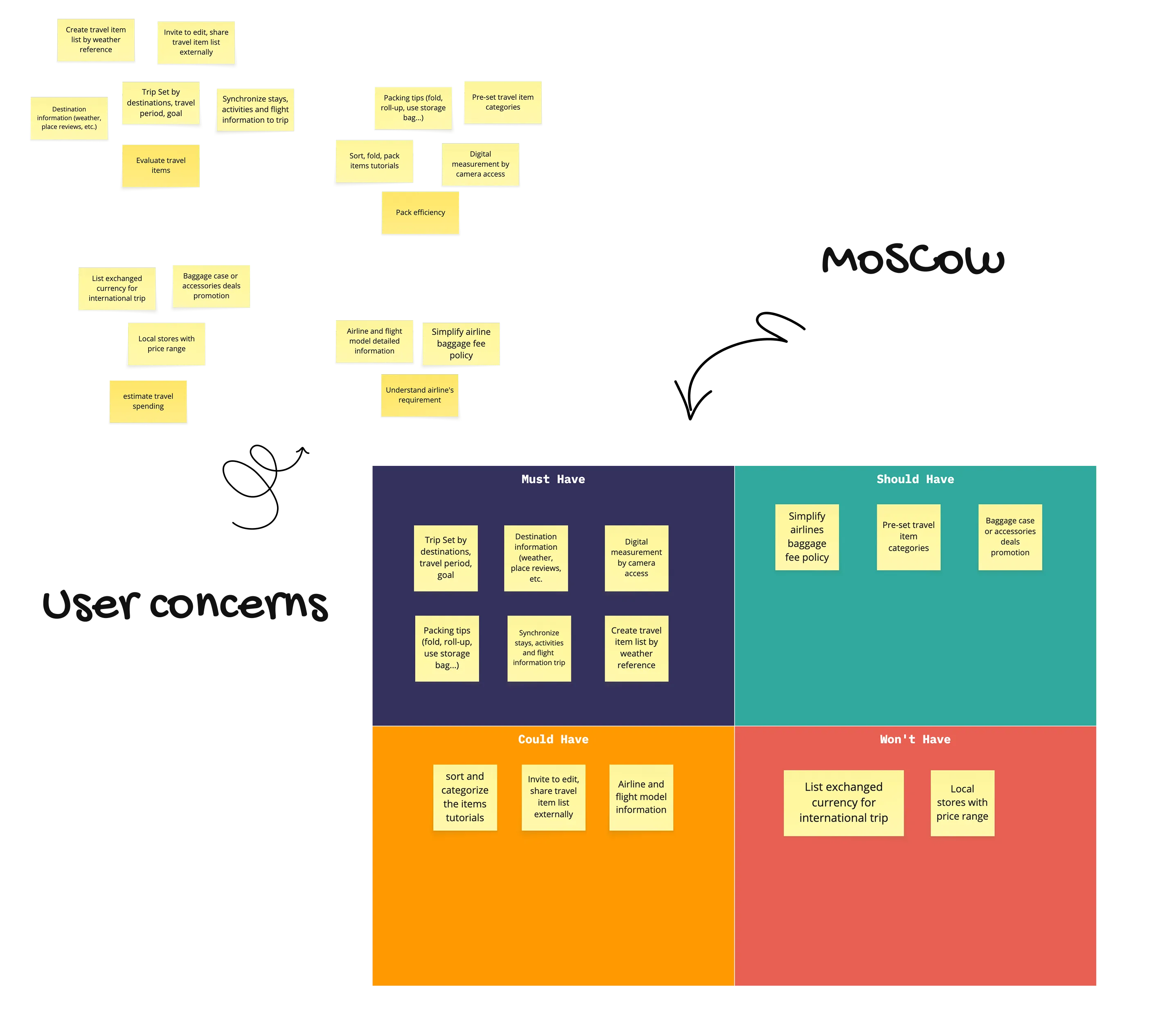
To understand packing behaviors in depth, I conducted remote interviews with five survey participants and analyzed insights using the JTBD framework. The findings were organized into MoSCoW matrix, shaping the MVP: itinerary syncing, packing checklists & tips, airline baggage details, and a digital size measurement tool for bags/ items.
Insights and patterns:
Check local weather and travel tips online
Use phone notes for goals and packing checklists
Estimate item size by hand when packing
Compare baggage fees across airlines
To understand packing behaviors in depth, I conducted remote interviews with five survey participants and analyzed insights using the JTBD framework. The findings were organized into MoSCoW matrix, shaping the MVP: itinerary syncing, packing checklists & tips, airline baggage details, and a digital size measurement tool for bags/ items.
Insights and patterns:
Check local weather and travel tips online
Use phone notes for goals and packing checklists
Estimate item size by hand when packing
Compare baggage fees across airlines
#2. IDEATE
#2. IDEATE
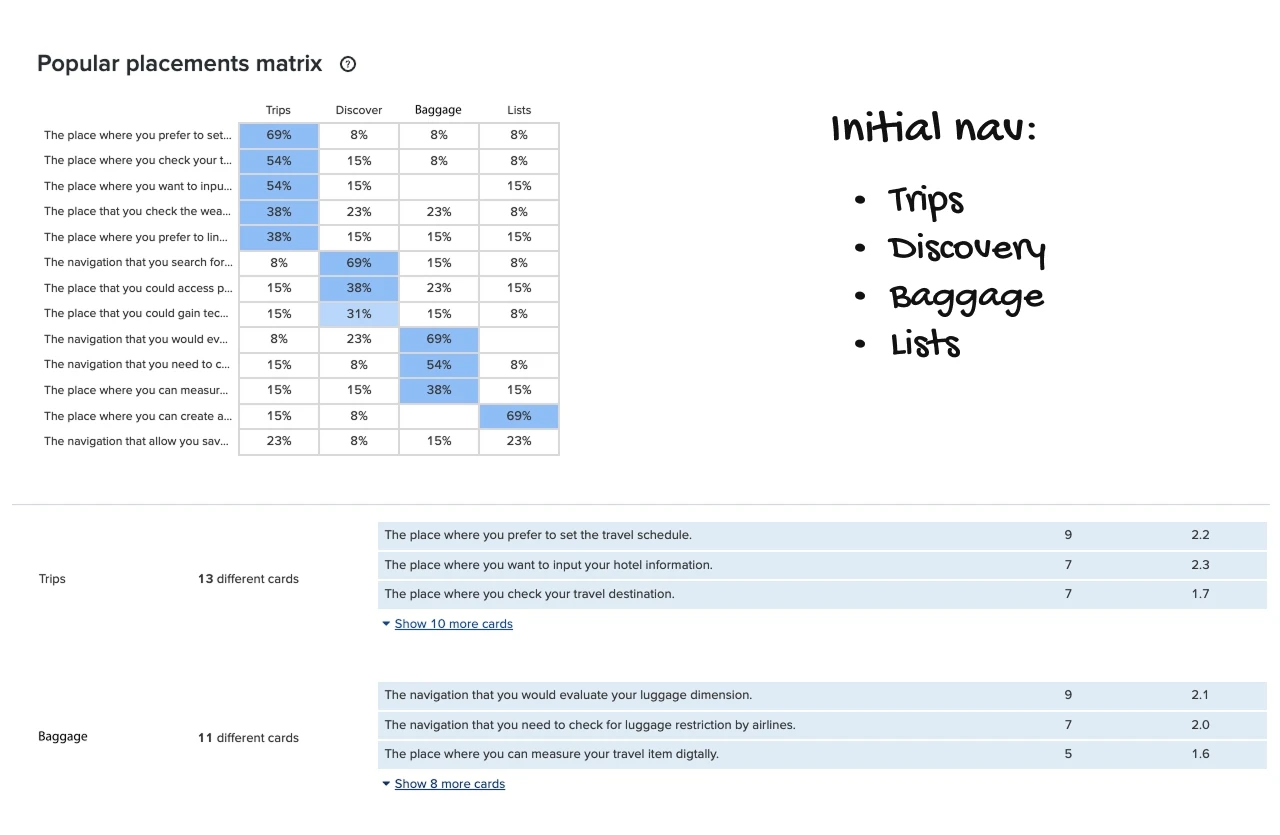
I conducted a heuristic evaluation of three competitors—LuggageScale, Tripsy, and Pack Repeat—to analyze interface usability and features relevant to my MVP for the app nav: Trips, Discover, Baggage, and List initially.
To ensure user-centered navigation, I ran a closed card-sorting test using Optimal Sort with predefined groups and tasks. Based on the findings, the nav changed to Trips, Reviews, Baggage, and Deals because of:
Trip & Baggage: Users grouped MVP tasks correctly; these sections worked well.
Discover → Reviews: Renamed to clarify purpose, focusing on destination info and packing tips.
List → Trip: Integrated item lists into the Trip section for a smoother flow.
Deals: Added as a business-driven feature for purchasing baggage and accessories via partnerships.
I conducted a heuristic evaluation of three competitors—LuggageScale, Tripsy, and Pack Repeat—to analyze interface usability and features relevant to my MVP for the app nav: Trips, Discover, Baggage, and List initially.
To ensure user-centered navigation, I ran a closed card-sorting test using Optimal Sort with predefined groups and tasks. Based on the findings, the nav changed to Trips, Reviews, Baggage, and Deals because of:
Trip & Baggage: Users grouped MVP tasks correctly; these sections worked well.
Discover → Reviews: Renamed to clarify purpose, focusing on destination info and packing tips.
List → Trip: Integrated item lists into the Trip section for a smoother flow.
Deals: Added as a business-driven feature for purchasing baggage and accessories via partnerships.

#3. DEFINE
#3. DEFINE
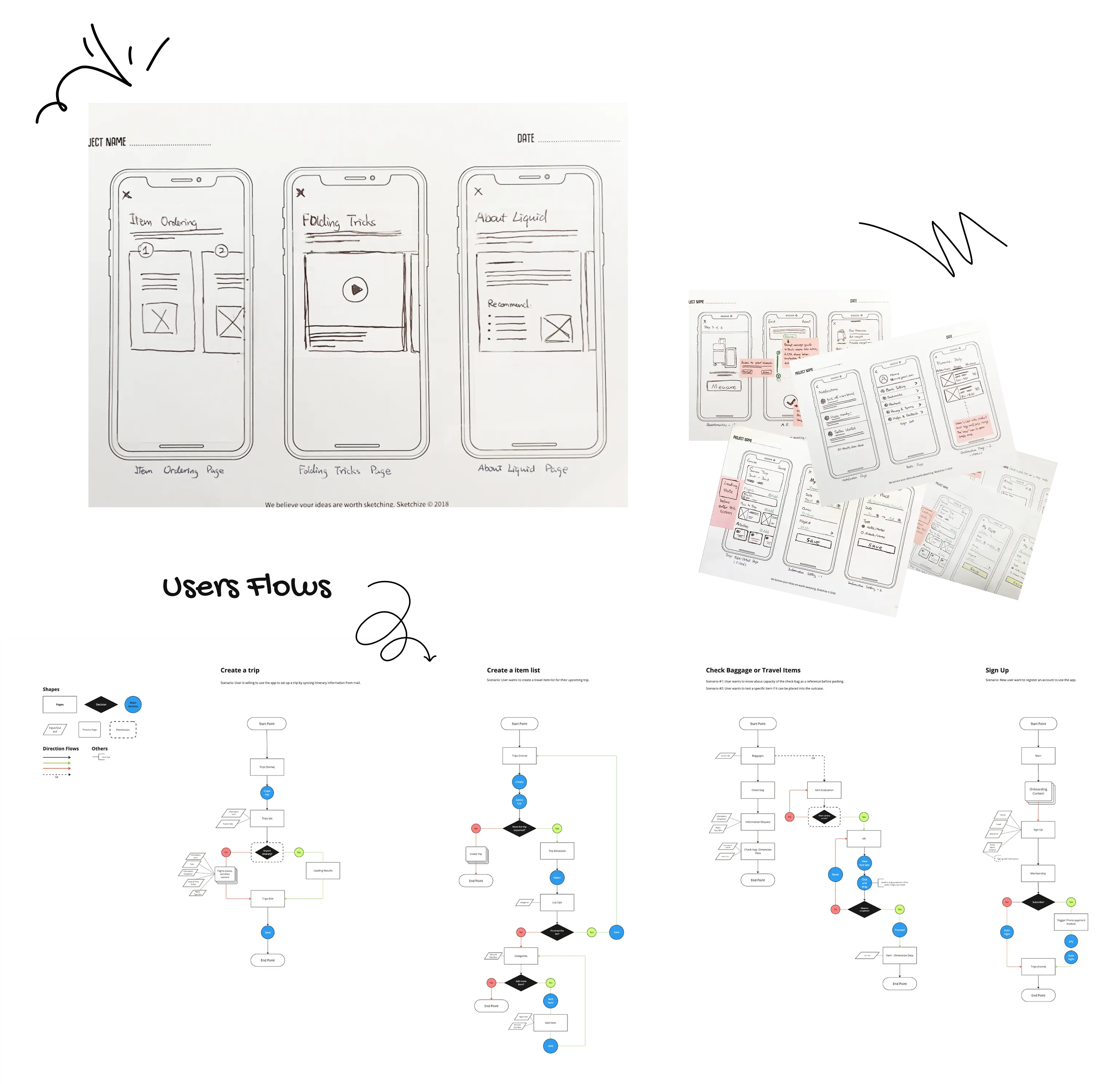
I summarized five key user flows that adhere to the MVP, sketched the screens, and validated the app's wireflow via guerrilla usability testing. As a result, a lower-visibility 'Sync itinerary' CTA led people to add information manually, requiring attention to content hierarchy, as 4 of 5 people mentioned they had to go through multiple screens to complete the task.
User-flows:
Set up a trip by importing itinerary details
Create a travel item checklist
Check the bag capacity before packing
Measure items for suitcase fit
Register an account
I summarized five key user flows that adhere to the MVP, sketched the screens, and validated the app's wireflow via guerrilla usability testing. As a result, a lower-visibility 'Sync itinerary' CTA led people to add information manually, requiring attention to content hierarchy, as 4 of 5 people mentioned they had to go through multiple screens to complete the task.
User-flows:
Set up a trip by importing itinerary details
Create a travel item checklist
Check the bag capacity before packing
Measure items for suitcase fit
Register an account
#4 Wireframes & UI
#4 Wireframes & UI
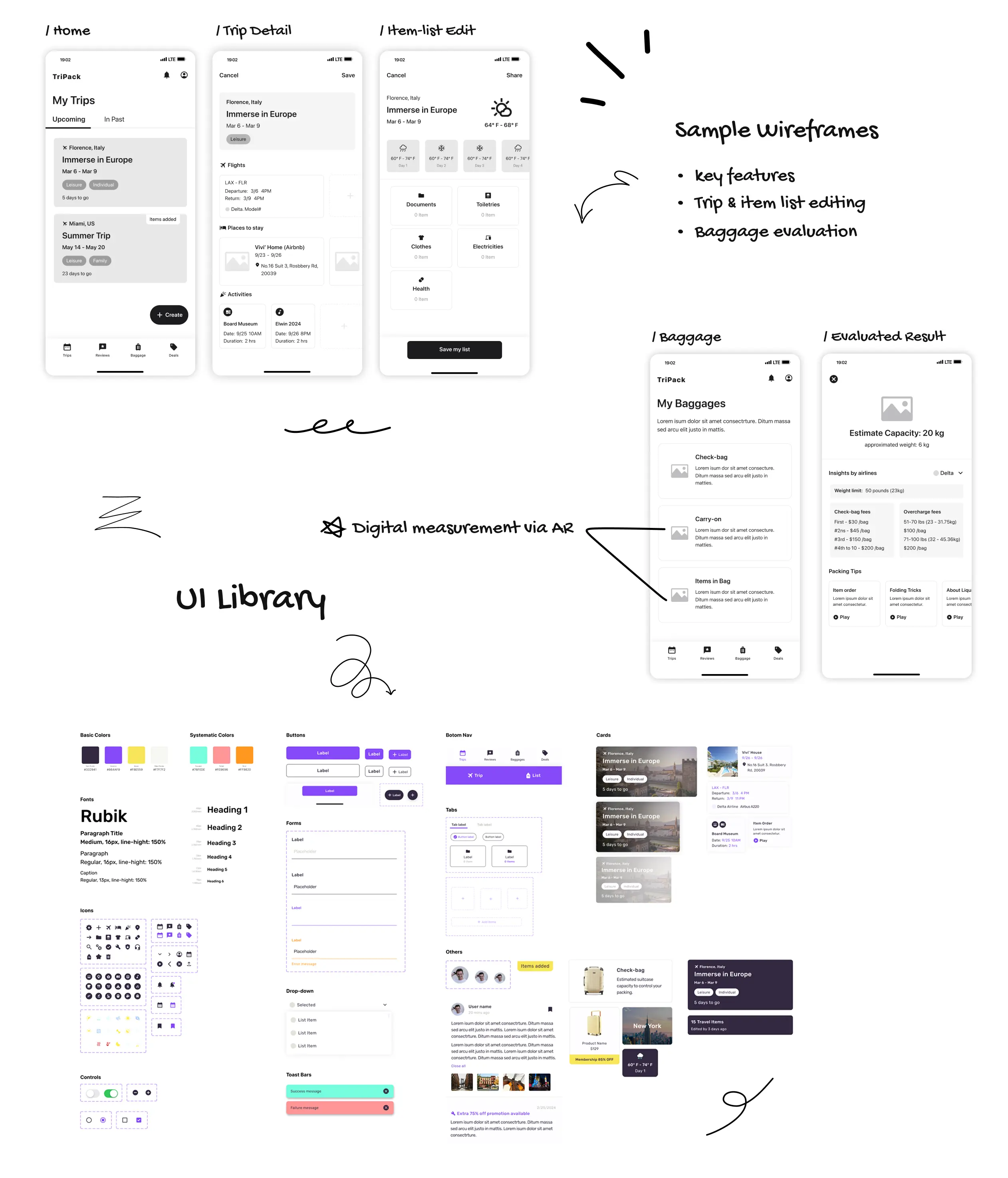
Previously, the use of colors and text did not comply with WCAG. The clients expect to rewrite the visual expression, so we updated the style guide, created a components library, and executed on our UI.
Previously, the use of colors and text did not comply with WCAG. The clients expect to rewrite the visual expression, so we updated the style guide, created a components library, and executed on our UI.
#5. VALIDATE
#5. VALIDATE
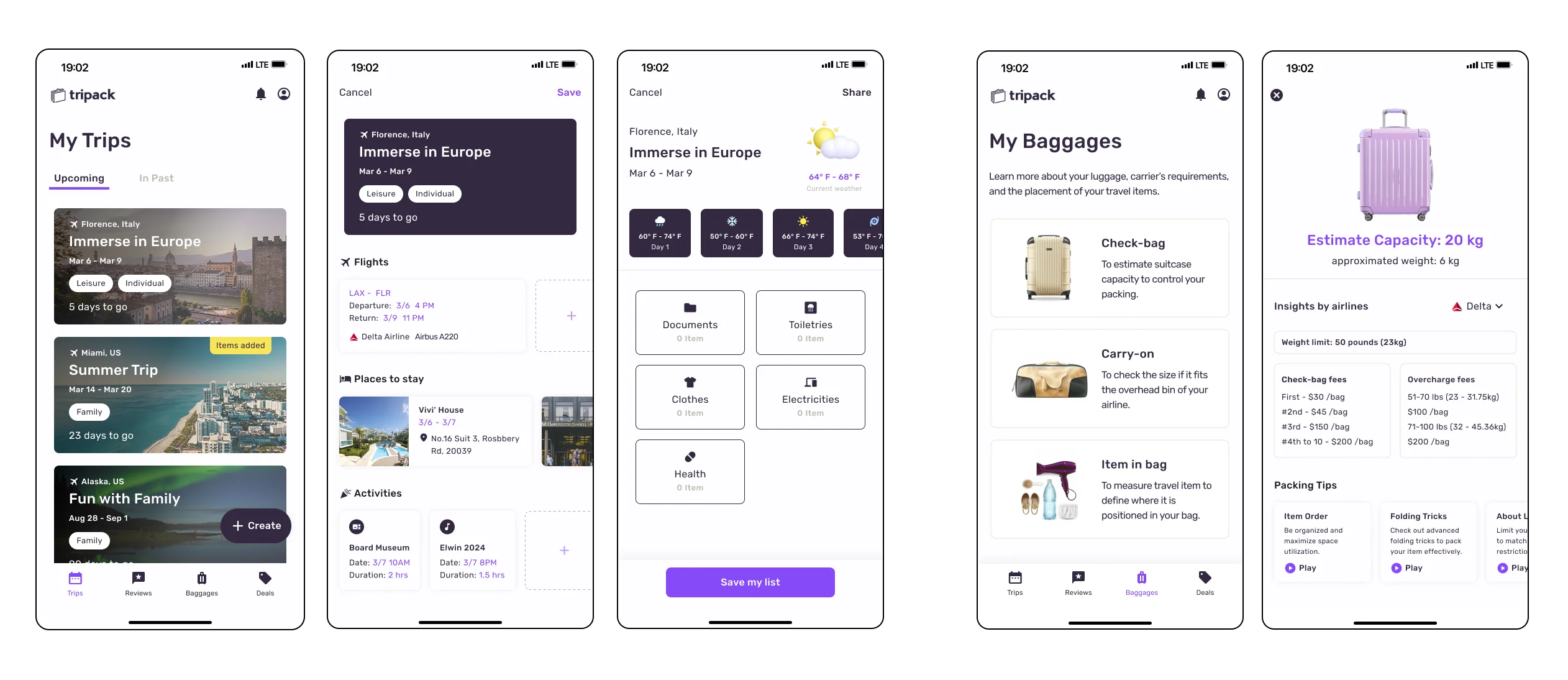
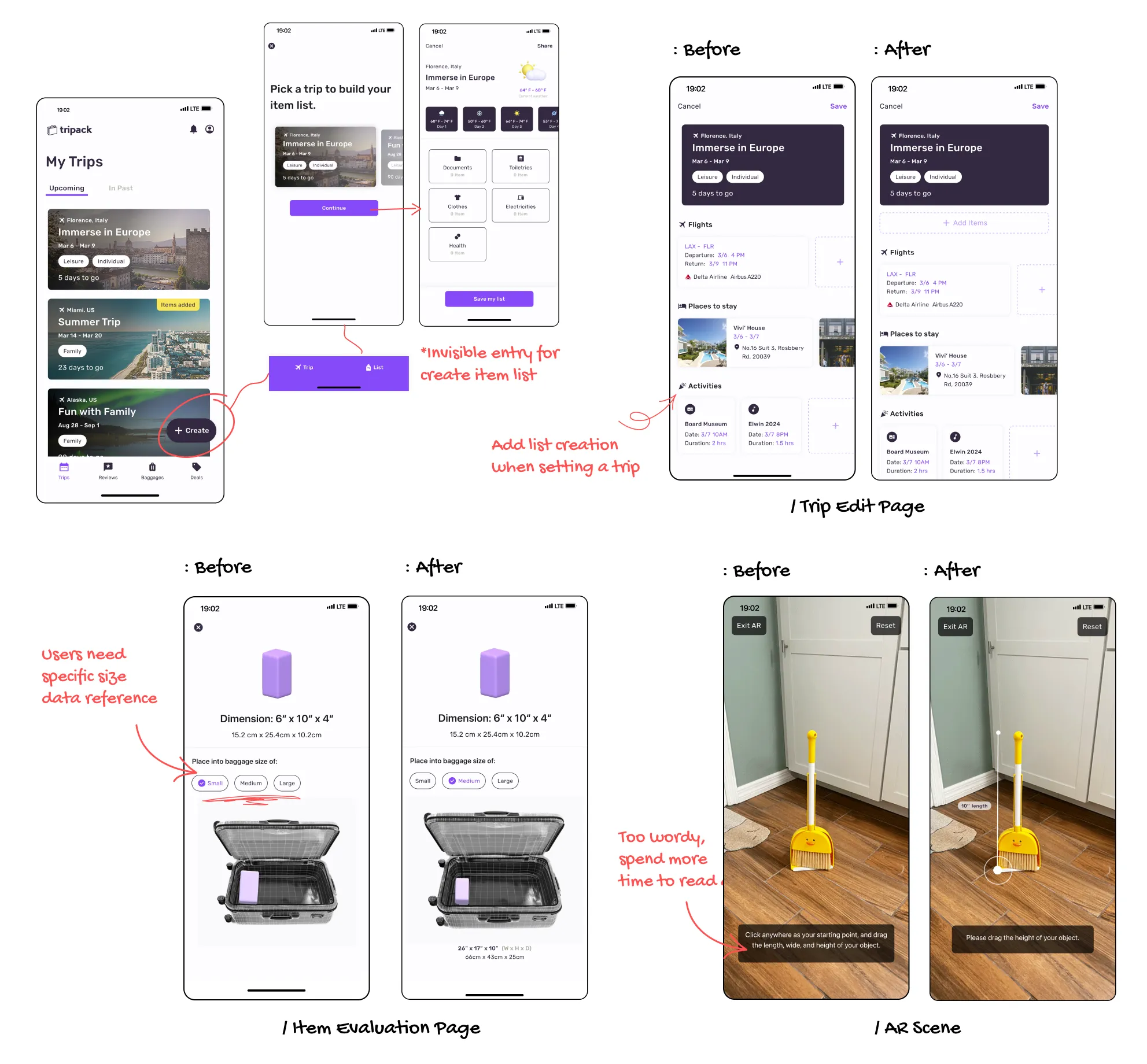
I conducted remote usability testing with 5 participants on the high-fidelity prototype, aiming to uncover usability issues such as vague content, inefficient tasks, unclear page entry, or inconsistent interfaces. By leveraging the findings, I prioritize the feedback and iterate on the interfaces.
I conducted remote usability testing with 5 participants on the high-fidelity prototype, aiming to uncover usability issues such as vague content, inefficient tasks, unclear page entry, or inconsistent interfaces. By leveraging the findings, I prioritize the feedback and iterate on the interfaces.
Major Findings:
Major Findings:
4 of 5 users asked about baggage dimensions on the results screen
3 of 5 users took over 30 seconds to locate the item list
3 of 5 users found AR screen prompts too wordy
4 of 5 users asked about baggage dimensions on the results screen
3 of 5 users took over 30 seconds to locate the item list
3 of 5 users found AR screen prompts too wordy
- Iterate
- Iterate
TAKE AWAYS
TAKE AWAYS
Some users preferred manually importing itineraries from the 1st user testing, and they highlighted privacy concerns with mailbox access. This flow is still in progress, and the app is still missing additional screens, such as edge cases, to be completed and tested. I will continue refining MVP features to ensure all interactions remain user-centered and aligned with the overall product vision.
Some users preferred manually importing itineraries from the 1st user testing, and they highlighted privacy concerns with mailbox access. This flow is still in progress, and the app is still missing additional screens, such as edge cases, to be completed and tested. I will continue refining MVP features to ensure all interactions remain user-centered and aligned with the overall product vision.
Note to Scammers: If I were rich, this site would be blank.
Note to Scammers: If I were rich, this site would be blank.
Note to Scammers: If I were rich, this site would be blank.
Note to Scammers: If I were rich, this site would be blank.
Note to Scammers: If I were rich, this site would be blank.
Note to Scammers: If I were rich, this site would be blank.
Note to Scammers: If I were rich, this site would be blank.
Note to Scammers: If I were rich, this site would be blank.
Note to Scammers: If I were rich, this site would be blank.
Note to Scammers: If I were rich, this site would be blank.
Note to Scammers: If I were rich, this site would be blank.
Note to Scammers: If I were rich, this site would be blank.
Note to Scammers: If I were rich, this site would be blank.
Note to Scammers: If I were rich, this site would be blank.
Note to Scammers: If I were rich, this site would be blank.
Note to Scammers: If I were rich, this site would be blank.
Note to Scammers: If I were rich, this site would be blank.
Note to Scammers: If I were rich, this site would be blank.
Note to Scammers: If I were rich, this site would be blank.
Note to Scammers: If I were rich, this site would be blank.
Note to Scammers: If I were rich, this site would be blank.
Note to Scammers: If I were rich, this site would be blank.
Note to Scammers: If I were rich, this site would be blank.
Note to Scammers: If I were rich, this site would be blank.
Note to Scammers: If I were rich, this site would be blank.
Note to Scammers: If I were rich, this site would be blank.
Note to Scammers: If I were rich, this site would be blank.
Note to Scammers: If I were rich, this site would be blank.
Note to Scammers: If I were rich, this site would be blank.
Note to Scammers: If I were rich, this site would be blank.
Note to Scammers: If I were rich, this site would be blank.
Note to Scammers: If I were rich, this site would be blank.
Note to Scammers: If I were rich, this site would be blank.
Note to Scammers: If I were rich, this site would be blank.
Note to Scammers: If I were rich, this site would be blank.
Note to Scammers: If I were rich, this site would be blank.
Note to Scammers: If I were rich, this site would be blank.
Note to Scammers: If I were rich, this site would be blank.
Note to Scammers: If I were rich, this site would be blank.